DRIFT

The Apple Watch is one of the most versatile devices in the tech world, blending fitness tracking, communication, and convenience into a sleek wearable. While it works well out of the box, a few key setting tweaks can significantly enhance your experience. Customizing these settings helps you focus on what matters most, avoid distractions, and make your watch uniquely yours.

Here are the most impressionable Apple Watch settings you should adjust for a smoother experience:

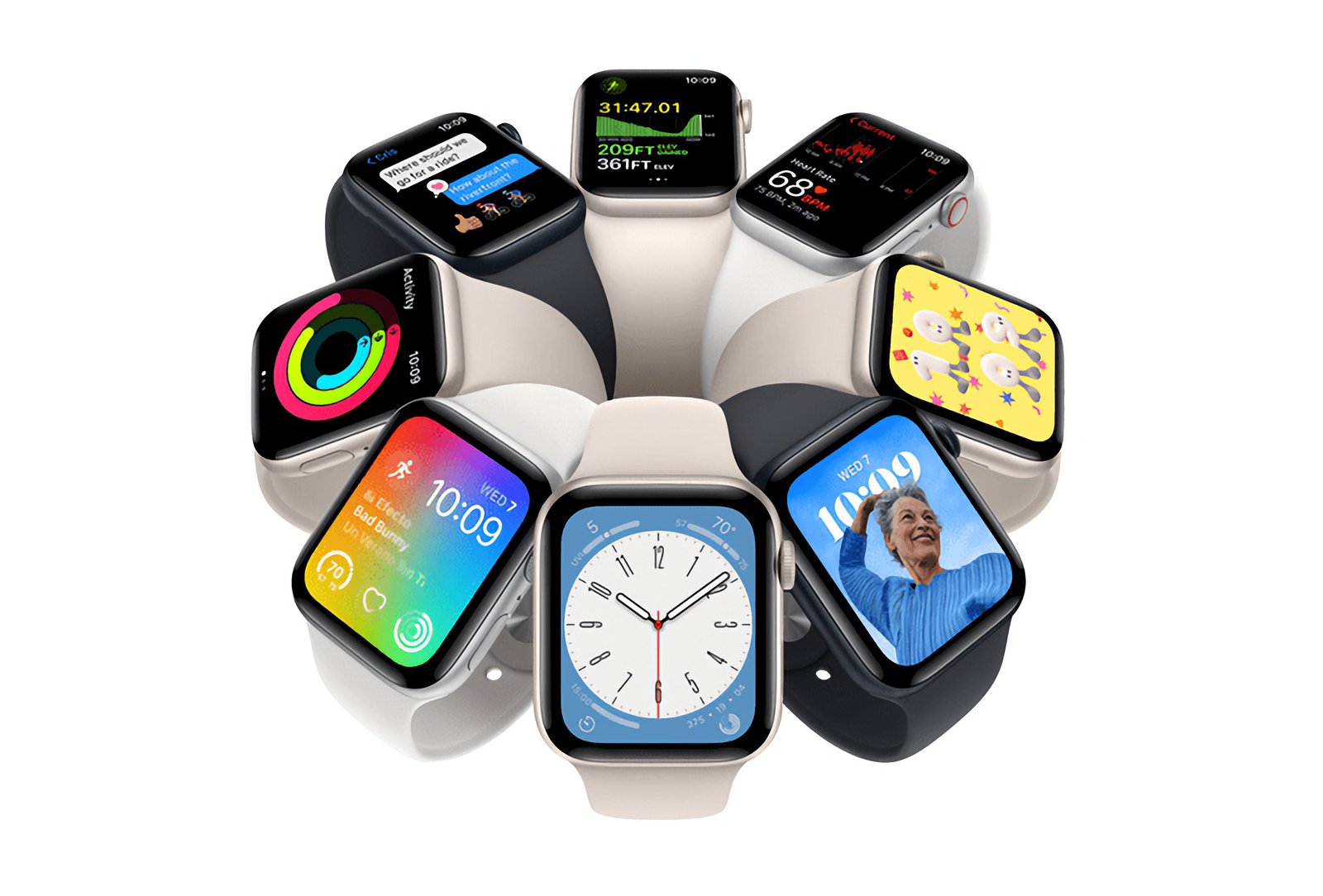
Optimize Your Watch Face

The watch face is the most visible part of your Apple Watch and serves as your primary interface. Customizing it to match your needs can save time and make your watch feel more intuitive.

•Add Useful Complications: Complications are small widgets that provide quick access to apps or information. For instance, you can add a weather complication for real-time updates or an activity ring to monitor fitness goals at a glance.

•Choose Faces for Specific Scenarios: Modular faces work well for productivity, while Infograph faces are ideal for displaying multiple data points. You can even create multiple faces and switch between them based on context—like a workout-focused face for the gym and a minimal face for formal events.

•Simplify for Minimalism: If you prefer a clean, distraction-free look, opt for a face like California or Numerals, which focus on basic timekeeping.

Refine Notification Settings

Notifications are helpful but can become overwhelming. By fine-tuning what appears on your wrist, you can stay informed without unnecessary distractions.

•Customize Notifications: Open the Watch app on your iPhone and go to Notifications. Turn off alerts for apps that aren’t essential, like social media or gaming apps, and keep only those you truly need, such as calls, messages, and calendar reminders.

•Enable Notification Privacy: Under Settings > Notifications > Notification Privacy, you can hide the content of notifications until you tap on them. This is particularly useful in public spaces.

•Use Focus Modes: Sync the watch with your iPhone’s Focus modes. For example, during Work mode, only receive notifications from work-related apps, while personal notifications come through in Personal mode.

Adjust Display Settings

The display settings can significantly affect how your Apple Watch performs, particularly regarding battery life and readability.

•Always-On Display Settings: If you have a Series 5 or later, the always-on display is a game-changer for glanceable information. However, turning it off can save battery life. Find this option under Settings > Display & Brightness.

•Increase Text Size: If you find the screen too small to read comfortably, go to Settings > Display & Brightness > Text Size to increase the font size.

Personalize Haptics and Sounds

The Apple Watch’s haptic feedback and sound alerts can be customized to suit your preferences.

•Adjust Haptic Strength: Under Settings > Sounds & Haptics, you can increase the haptic feedback to ensure you don’t miss alerts.

•Enable Silent Mode: If you’re in meetings or quiet environments often, toggle on Silent Mode to mute sounds without affecting haptic notifications.

Customize the Dock

The Dock offers quick access to apps, but it works best when tailored to your needs.

•Switch to Favorites: By default, the Dock shows recently used apps. Switching to Favorites lets you curate a list of apps you use most frequently. Go to the Watch app on your iPhone and select Dock > Favorites.

•Reorganize Apps in the Dock: Drag and drop apps in the Dock settings to prioritize the ones you use most.

Optimize Fitness and Health Tracking

Your Apple Watch excels as a fitness tracker, but it’s even better when customized to match your activity levels and goals.

•Set Your Activity Goals: Open the Activity app on your watch, scroll down, and select Change Goals. Adjust your move, exercise, and stand goals to reflect your current fitness journey.

•Enable Automatic Workout Detection: Under Settings > Workout, toggle on Start Workout Reminder and End Workout Reminder. This ensures your workouts are tracked even if you forget to start or stop them manually.

•Sync with Third-Party Apps: Apps like Strava or MyFitnessPal offer additional features and metrics, which you can integrate with the Health app for more detailed tracking.

Extend Battery Life

Battery life is one of the most common concerns for Apple Watch users. These settings can help you maximize it:

•Reduce Screen Wake Time: Go to Settings > Display & Brightness > Wake Duration and select the shortest option to conserve battery.

•Disable Background App Refresh: Under Settings > General > Background App Refresh, turn off this feature for non-essential apps.

•Use Power Saving Mode for Workouts: In Settings > Workout, enable Power Saving Mode to disable the heart rate sensor during longer activities.

Enhance Safety Features

Apple Watch’s safety settings, like Emergency SOS and Fall Detection, can provide peace of mind.

•Enable Fall Detection: Go to the Watch app on your iPhone, select Emergency SOS, and turn on Fall Detection. This feature is especially valuable for older users or those engaging in risky activities.

•Set Up Emergency Contacts: Add emergency contacts in the Health app. In the event of a fall or emergency, these contacts will be notified automatically.

Tweak Siri Settings

Siri on the Apple Watch can be incredibly convenient, but it’s best when configured to suit your needs.

•Enable “Raise to Speak”: This feature lets you activate Siri simply by lifting your wrist and speaking, without saying “Hey Siri.” Find this under Settings > Siri.

•Customize Siri’s Feedback: You can choose between voice feedback, silent mode, or haptic-only responses, depending on your preferences.

Use Accessibility Features

Accessibility options on the Apple Watch can improve usability for everyone, not just those with disabilities.

•Enable Zoom: If you have difficulty reading the small screen, go to Settings > Accessibility > Zoom and turn it on. You can double-tap the display to zoom in or out.

•Try AssistiveTouch: AssistiveTouch allows you to navigate the watch using hand gestures. This is especially useful during workouts or when your hands are busy.

Leverage Wallet and Apple Pay

The Wallet app transforms your Apple Watch into a contactless payment device and digital ticket holder.

•Set Up Apple Pay: Open the Watch app on your iPhone and go to Wallet & Apple Pay to add your credit or debit cards.

•Store Transit and Event Tickets: You can also add boarding passes, transit cards, or event tickets to your Wallet for easy access.

Enable Sleep Tracking

Sleep tracking can help you monitor rest patterns and improve your sleep quality.

•Set a Sleep Schedule: Open the Sleep app or go to Settings > Sleep to configure your bedtime and wake-up alarms.

•Enable Wind Down Mode: This feature reduces distractions before bedtime by dimming your screen and silencing notifications.

Organize Your Apps

Navigating the Apple Watch’s honeycomb grid can be frustrating, but switching to list view can make it more intuitive.

•Switch to List View: In the Watch app on your iPhone, select App View > List View. This organizes your apps alphabetically.

•Rearrange Your Grid Layout: If you prefer the grid view, rearrange apps directly on the watch by long-pressing and dragging them into a logical order.

Final Thoughts

The Apple Watch is an incredibly powerful tool, but its default settings don’t always reflect how you live your life. By taking the time to customize your watch face, refine notifications, optimize fitness tracking, and tweak features like the Dock and Siri, you can turn your Apple Watch into a seamless extension of your daily routine.

These adjustments are easy to make and can significantly enhance your experience, ensuring your Apple Watch works for you—not the other way around. Take control of your settings today and unlock the full potential of this remarkable device.

Related Articles

Modern data center facility with a solar-panel-clad exterior, bright green administrative offices, and secure perimeter fencing, showcasing sustainable digital infrastructure and renewable energy integration

Lombardy’s Data Center Boom: Balancing Digital Ambition with Environmental Responsible

Lombardy has emerged as Italy’s primary hub for new digital infrastructures, particularly data centers—vast complexes […]

In a highly anticipated reunion after 24 years, Adidas Originals and Coca-Cola have joined forces once again to celebrate the FIFA World Cup 2026™. The collaboration revives their iconic 2002 partnership from the Japan-South Korea tournament, now reimagined for the biggest global sporting event of 2026, co-hosted by the United States, Canada, and Mexico. Set to launch on June 6, 2026, this collection masterfully blends Adidas' streetwear heritage with Coca-Cola's timeless branding, creating a vibrant fusion of football culture, nostalgia, and modern style. The drop arrives at a perfect moment. With the World Cup kicking off on June 11, 2026, fans worldwide are gearing up for a summer of football excitement. This collaboration isn't just merch—it's a cultural statement that merges two legendary brands under the banner of "Originals are the Real Thing," a clever twist on Coca-Cola's famous slogan. Historical Context: A Reunion 24 Years in the Making Adidas and Coca-Cola first collaborated during the 2002 FIFA World Cup, producing limited-edition pieces that captured the era's energy. That partnership helped define early 2000s football-streetwear crossover culture. Fast-forward to 2026, and the brands are back with fresh energy, leveraging Adidas' deep FIFA ties (as an official partner) and Coca-Cola's long-standing sponsorship of the tournament. The 2026 edition promises to be historic as the first 48-team World Cup, spanning three countries and generating unprecedented global hype. This collab taps into that momentum, offering fans wearable pieces that celebrate both brands' legacies while looking forward to the future of football fashion. Collection Overview and Design Philosophy The Adidas Originals x Coca-Cola collection fuses 2000s street style with classic sporting aesthetics. Expect bold reds, creams, whites, and silver accents inspired by Coca-Cola's iconic packaging—think classic script logos, droplet detailing, and can-inspired motifs. The lineup spans footwear, apparel, and accessories, divided into two visual directions: one logo-heavy and graphic-forward, the other drawing from vintage advertising aesthetics. Designs pay homage to Coca-Cola's visual language while staying true to Adidas Originals' archival roots. High-quality materials, attention to detail, and versatile silhouettes make these pieces suitable for both match-day wear and everyday street style. The campaign, featuring young football star Lamine Yamal and a diverse cast in everyday scenes building anticipation for the tournament, reinforces themes of originality and shared cultural moments. Footwear Highlights Footwear takes center stage in this collaboration, with reimagined takes on iconic 2000s Adidas silhouettes: Samba and Superstar Models: These classics get Coca-Cola treatment with white/cream/red colorways and prominent script branding. The Samba blends street heritage with football roots, while the Superstar II features weathered bases and bold side panels. Expected pricing around $110–$130. Adistar Control 5: A standout with droplet detailing mimicking condensation on a cold Coke can. This model brings performance-inspired design into lifestyle territory. Predator Sala: Indoor/hybrid style with silver-and-red accents, nodding to predatory precision on the pitch and Coca-Cola's bold energy. Climacool 1: Revived with breathable tech and Coke-inspired graphics, perfect for warm summer days. Megaride F50: A highlight paying tribute to the iconic Coca-Cola glass bottle, with unique contours and refreshing design cues. Each pair incorporates thoughtful details like embroidered logos, custom insoles, and packaging that mimics vintage Coke crates or cans. These shoes are built for durability and comfort, appealing to sneakerheads, football fans, and casual wearers alike. Apparel and Accessories Beyond kicks, the collection offers a full lifestyle range: Track Tops and Jerseys: Standout jerseys fuse retro Coca-Cola advertising from different eras into cohesive football designs. Track jackets feature signature three stripes alongside Coke branding, in vibrant reds and classic whites. Shorts and T-Shirts: Relaxed fits with graphic prints, ideal for casual wear or layering. Expect motivational football motifs blended with refreshing beverage references. Accessories: A bright red airliner bag stands out as a functional statement piece. Additional items may include caps, socks, and tote bags carrying the collaborative spirit. The apparel emphasizes comfort with premium cotton blends, mesh panels for breathability, and oversized silhouettes popular in contemporary streetwear. Unisex sizing and inclusive fits make the collection accessible to a broad audience. Cultural Impact and Fan Appeal This collaboration resonates on multiple levels. For football fans, it represents national pride and global unity ahead of the 2026 tournament. Sneaker enthusiasts will appreciate the nostalgic 2000s revival mixed with modern execution. Streetwear collectors see it as a prime example of how heritage brands can innovate through partnerships. In an era where sports and fashion increasingly intersect, Adidas and Coca-Cola deliver pieces that transcend the pitch. Wear them to watch matches at home, attend watch parties, or hit the streets in any host city—New York, Los Angeles, Toronto, or beyond. The designs are versatile enough for gym sessions, festivals, or daily commutes. The timing aligns perfectly with rising interest in football in North America, boosted by the co-hosting nations. Young talents like Lamine Yamal in the campaign help bridge generational gaps, attracting newer fans while satisfying longtime supporters. Where to Buy and Release Details The collection launches globally on June 6, 2026, via: Adidas CONFIRMED app (for early access and raffles) Adidas.com Select retailers and flagship stores worldwide Some regions may see staggered drops, with Japan and other markets getting early access. Prices are expected to range from $50–$150 depending on the item, making it relatively accessible compared to ultra-limited drops. Pro Tips for Copping: Enable notifications on the CONFIRMED app. Check local stock at Adidas stores in major cities. Monitor resale platforms post-drop for exclusive colorways, but be wary of markups. Size up slightly for oversized apparel fits. Given the World Cup hype, popular items like the Sambas and jerseys are likely to sell out quickly. International shipping is available, but factor in potential customs delays. Styling Suggestions Match Day Look: Pair a collaborative jersey with classic black shorts and Samba sneakers for effortless fan style. Streetwear Rotation: Layer a track top over a graphic tee with wide-leg pants and the Megaride F50 for a bold urban ensemble. Casual Summer: White Superstar with denim shorts and the airliner bag for a refreshing, vacation-ready vibe. These pieces mix seamlessly with existing Adidas or neutral wardrobes, maximizing versatility. Broader Context in 2026 Fashion and Sports The Adidas x Coca-Cola drop is part of a larger wave of high-profile collaborations tied to the World Cup. Adidas continues its dominance in football kit design, while Coca-Cola leverages its sponsorship with collectibles, bottles, and experiential activations like the Trophy Tour. In the sneaker industry, this collab exemplifies the ongoing trend of lifestyle reinterpretations of performance silhouettes. It also highlights how global brands use major events to drive cultural conversations around unity, originality, and joy—core values for both companies. Sustainability notes (based on Adidas' broader initiatives) suggest some pieces may incorporate recycled materials, aligning with modern consumer expectations. Looking Forward: Legacy and Excitement As the countdown to kickoff continues, this collection serves as the perfect prelude to an unforgettable summer of football. Whether you're a die-hard supporter, a fashion-forward collector, or someone seeking motivation through style, the Adidas Originals x Coca-Cola FIFA World Cup 2026 lineup delivers. Expect potential restocks, special event exclusives in host cities, and continued campaign content featuring more athletes. This isn't just clothing—it's a ticket to participate in the global celebration of the beautiful game. Mark your calendars for June 6, 2026. Refresh your wardrobe, lace up those Sambas, and get ready to cheer on your team in style. The "Real Thing" meets the Originals in what promises to be one of the most talked-about releases of the year. This collaboration captures the essence of football's universal appeal: bringing people together through shared passion, iconic brands, and unforgettable moments. As the world prepares for 2026's expanded tournament, Adidas and Coca-Cola remind us that some partnerships are truly timeless.

Adidas Originals x Coca-Cola Collection: FIFA World Cup 2026

In a highly anticipated reunion after 24 years, Adidas Originals and Coca-Cola have joined forces […]

Loewe shoulder bag crafted in brown and black leather with minimalist lion face detailing and a matching fur tail charm

180 Years Unfolded: The Full Story Behind Loewe’s New Campaign

The year was 1846. Queen Victoria was on the British throne and the telephone, the […]